Array Methods You Must Know

If you are learning JavaScript, arrays are going to be your best friends. And guess what? Arrays come with some super cool built-in methods that make your life so much easier.
In this blog, we are going to learn 6 essential array methods that every JavaScript developer should know. Let's dive in.
1. push() and pop() - Adding and Removing from the End
Think of an array like a line of people. push() adds someone to the end of the line, and pop() removes the last person.
push() - Add to the End
let fruits = ["apple", "banana"];
console.log(fruits);  // ["apple", "banana"]

fruits.push("orange");
console.log(fruits);  // ["apple", "banana", "orange"]

// You can add multiple items at once!
fruits.push("mango", "grape");
console.log(fruits);  // ["apple", "banana", "orange", "mango", "grape"]
Before: ["apple", "banana"]
After: ["apple", "banana", "orange", "mango", "grape"]
pop() - Remove from the End
let fruits = ["apple", "banana", "orange"];
console.log(fruits);  // ["apple", "banana", "orange"]

let removed = fruits.pop();
console.log(removed);  // "orange"
console.log(fruits);   // ["apple", "banana"]
Before: ["apple", "banana", "orange"]
After: ["apple", "banana"]
2. shift() and unshift() - Adding and Removing from the Beginning
These are like push and pop, but they work at the start of the array instead of the end.
shift() - Remove from the Beginning
let colors = ["red", "green", "blue"];
console.log(colors);  // ["red", "green", "blue"]

let firstColor = colors.shift();
console.log(firstColor);  // "red"
console.log(colors);      // ["green", "blue"]
Before: ["red", "green", "blue"]
After: ["green", "blue"]
unshift() - Add to the Beginning
let colors = ["green", "blue"];
console.log(colors);  // ["green", "blue"]

colors.unshift("red");
console.log(colors);  // ["red", "green", "blue"]

// You can add multiple items!
colors.unshift("yellow", "orange");
console.log(colors);  // ["yellow", "orange", "red", "green", "blue"]
Before: ["green", "blue"]
After: ["yellow", "orange", "red", "green", "blue"]
3. map() - Transform Every Item
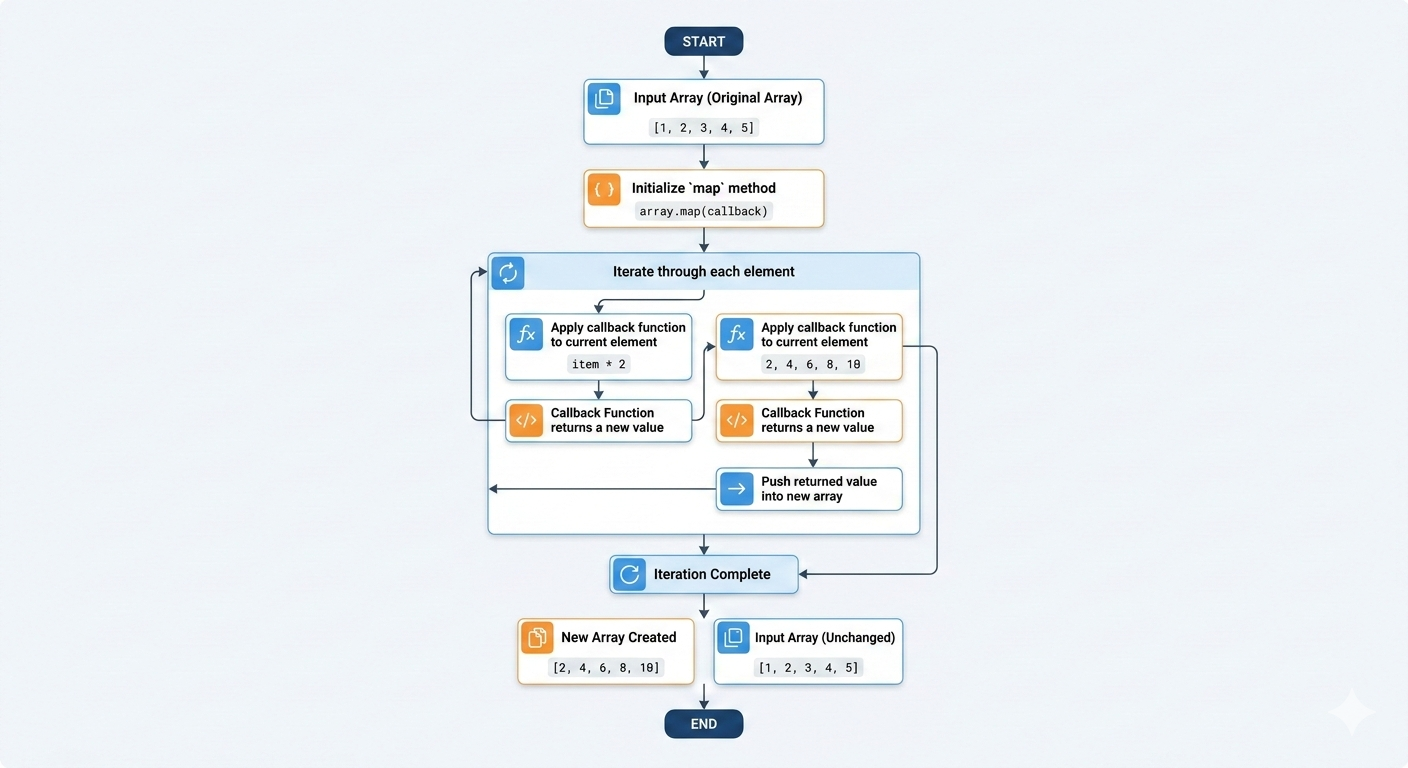
map() is super powerful! It takes each item in your array, does something with it, and gives you a new array with the transformed items.
Important note: The original array stays the same
Example: Double All Numbers
Using traditional for loop:
let numbers = [1, 2, 3, 4, 5];
let doubled = [];

for (let i = 0; i < numbers.length; i++) {
    doubled.push(numbers[i] * 2);
}

console.log(doubled);  // [2, 4, 6, 8, 10]
Using map() - Much cleaner
let numbers = [1, 2, 3, 4, 5];

let doubled = numbers.map(function(num) {
    return num * 2;
});

console.log(doubled);  // [2, 4, 6, 8, 10]
console.log(numbers);  // [1, 2, 3, 4, 5] - Original unchanged!
Before: [1, 2, 3, 4, 5]
After (new array): [2, 4, 6, 8, 10]
More Practical Examples
Convert temperatures from Celsius to Fahrenheit:
let celsius = [0, 10, 20, 30];

let fahrenheit = celsius.map(function(temp) {
    return (temp * 9/5) + 32;
});

console.log(fahrenheit);  // [32, 50, 68, 86]
Add "Mr." to all names:
let names = ["John", "Peter", "Alice"];

let formalNames = names.map(function(name) {
    return "Mr. " + name;
});

console.log(formalNames);  // ["Mr. John", "Mr. Peter", "Mr. Alice"]
Key point: map() always returns a new array with the same number of items as the original.
4. filter() - Keep Only What You Want
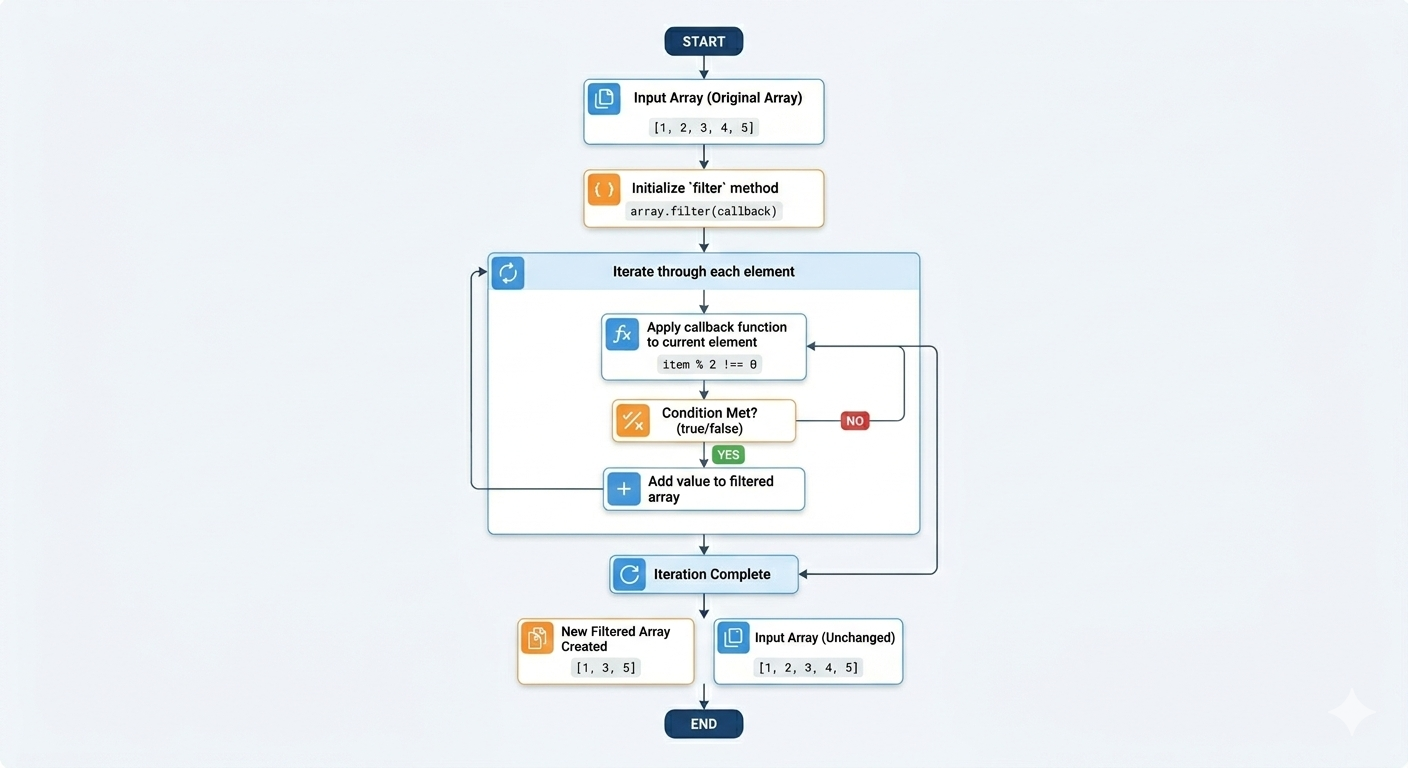
filter() is like a bouncer at a club, it only lets items through if they meet certain conditions. It gives you a new array with only the items that passed the test.
Example: Get Only Even Numbers
Using traditional for loop:
let numbers = [1, 2, 3, 4, 5, 6, 7, 8, 9, 10];
let evenNumbers = [];

for (let i = 0; i < numbers.length; i++) {
    if (numbers[i] % 2 === 0) {
        evenNumbers.push(numbers[i]);
    }
}

console.log(evenNumbers);  // [2, 4, 6, 8, 10]
Using filter() - So much easier
let numbers = [1, 2, 3, 4, 5, 6, 7, 8, 9, 10];

let evenNumbers = numbers.filter(function(num) {
    return num % 2 === 0;
});

console.log(evenNumbers);  // [2, 4, 6, 8, 10]
Before: [1, 2, 3, 4, 5, 6, 7, 8, 9, 10]
After (new array): [2, 4, 6, 8, 10]
More Practical Example
Get products under $50:
let prices = [25, 60, 15, 120, 45, 80];

let affordable = prices.filter(function(price) {
    return price < 50;
});

console.log(affordable);  // [25, 15, 45]
Get names longer than 4 letters:
let names = ["Ravi", "Akash", "Jay", "Piyush"];

let longNames = names.filter(function(name) {
    return name.length > 4;
});

console.log(longNames);  // ["Akash", "Piyush"]
Get students who passed (score >= 50):
let scores = [45, 78, 32, 90, 55, 40];

let passedScores = scores.filter(function(score) {
    return score >= 50;
});

console.log(passedScores);  // [78, 90, 55]
Key point: filter() returns a new array that can be shorter than the original (or even empty).
5. reduce() - Combine Everything Into One Value
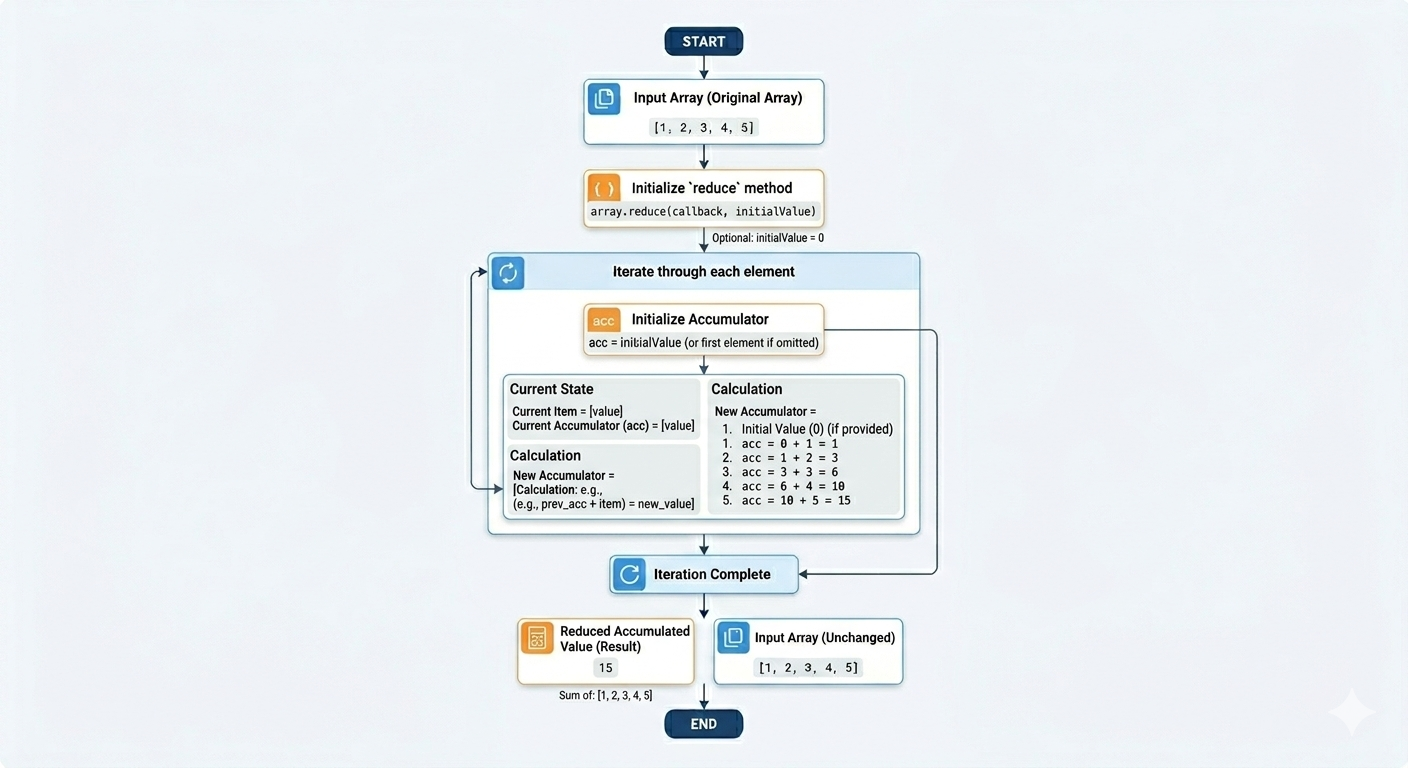
Okay, reduce() sounds scary, but it's actually simple once you get it.
Think of it like this: You have a bunch of numbers, and you want to add them all up into one final total. That's what reduce() does, it "reduces" an array down to a single value.
Example: Calculate Total Sum
Using traditional for loop:
let numbers = [10, 20, 30, 40, 50];
let total = 0;

for (let i = 0; i < numbers.length; i++) {
    total = total + numbers[i];
}

console.log(total);  // 150
Using reduce():
let numbers = [10, 20, 30, 40, 50];

let total = numbers.reduce(function(sum, num) {
    return sum + num;
}, 0);

console.log(total);  // 150
Before: [10, 20, 30, 40, 50]
After: 150 (a single number)
How does it work?
Let's break it down step by step:
let numbers = [10, 20, 30];

let total = numbers.reduce(function(sum, num) {
    console.log("sum:", sum, "num:", num);
    return sum + num;
}, 0);

// Output:
// sum: 0   num: 10   → returns 10
// sum: 10  num: 20   → returns 30
// sum: 30  num: 30   → returns 60
// Final result: 60
sumis your running total (starts at 0)numis each number from the arrayEach time, you add
numtosumThe result becomes the new
sumfor the next round
Another Example: Find the Maximum Number
let numbers = [5, 12, 8, 130, 44];

let max = numbers.reduce(function(highest, num) {
    if (num > highest) {
        return num;
    } else {
        return highest;
    }
}, 0);

console.log(max);  // 130
reduce() feels tricky at first, it takes practice! The most common use is adding up numbers.
6. forEach() - Do Something With Each Item
forEach() is the simplest one. It just loops through your array and lets you do something with each item. It doesn't return anything, it's just for doing actions.
Example: Print All Items
Using traditional for loop:
let fruits = ["apple", "banana", "orange"];

for (let i = 0; i < fruits.length; i++) {
    console.log(fruits[i]);
}
Using forEach():
let fruits = ["apple", "banana", "orange"];

fruits.forEach(function(fruit) {
    console.log(fruit);
});

// Output:
// apple
// banana
// orange
More Examples
Print numbers with their position:
let numbers = [10, 20, 30];

numbers.forEach(function(num, index) {
    console.log("Position " + index + ": " + num);
});

// Output:
// Position 0: 10
// Position 1: 20
// Position 2: 30
Add all students to a list on a webpage:
let students = ["Jay", "Sara", "Akash"];

students.forEach(function(student) {
    console.log("Welcome, " + student + "!");
});

// Output:
// Welcome, Jay!
// Welcome, Sara!
// Welcome, Akash!
Key point: forEach() doesn't create a new array. It's just for doing something with each item (like printing, updating the page, etc.).
Quick Comparison: map() vs filter() vs forEach()
Let me show you the difference with the same array:
let numbers = [1, 2, 3, 4, 5];

// map() - Transform each item, get new array
let doubled = numbers.map(function(num) {
    return num * 2;
});
console.log(doubled);  // [2, 4, 6, 8, 10]

// filter() - Keep only items that pass test, get new array
let bigNumbers = numbers.filter(function(num) {
    return num > 3;
});
console.log(bigNumbers);  // [4, 5]

// forEach() - Just do something, no return value
numbers.forEach(function(num) {
    console.log(num);
});
// Output: 1, 2, 3, 4, 5 (prints each one)
Assignment Time!
Now it's your turn to practice! Open your browser console and try this:
// Step 1: Create an array of numbers
let numbers = [5, 12, 8, 20, 3, 15];

// Step 2: Use map() to double each number
let doubled = numbers.map(function(num) {
    return num * 2;
});
console.log("Doubled:", doubled);

// Step 3: Use filter() to get numbers greater than 10
let bigNumbers = doubled.filter(function(num) {
    return num > 10;
});
console.log("Greater than 10:", bigNumbers);

// Step 4: Use reduce() to calculate total sum
let total = bigNumbers.reduce(function(sum, num) {
    return sum + num;
}, 0);
console.log("Total:", total);
```

Expected Output:
```
Doubled: [10, 24, 16, 40, 6, 30]
Greater than 10: [24, 16, 40, 30]
Total: 110
Summary
Let's recap what we learned:
push() / pop() - Add/remove from end
shift() / unshift() - Add/remove from beginning
map() - Transform every item → new array
filter() - Keep only some items → new array
reduce() - Combine everything → single value
forEach() - Do something with each item → no return
Pro tip: The best way to learn is by doing. Open your browser console right now and try these methods with your own examples. Make mistakes, experiment, and have fun!
Remember: map(), filter(), and reduce() don't change the original array, they create new ones. This is really important.

