Control Flow in JavaScript: If, Else, and Switch Explained
A beginner-friendly guide to making decisions in your code, with real life examples.
What Is Control Flow?
Think about your morning routine. You wake up and think:
"Is it raining outside? If yes, I'll take an umbrella. If no, I'll leave without one."
That's a decision. And decisions like this happen all the time in programming too.
Control flow is just a fancy term for: "the order in which your code runs, based on conditions."
Without control flow, your program would just run from top to bottom, every single line, every single time. But with control flow, your program can make choices, just like you do in real life.
JavaScript gives us three main tools to control this flow:
ifstatementif-elsestatementswitchstatement
Let's learn each one, step by step.
1. The if Statement
Real-Life Analogy
"If I am hungry, I will eat something."
If you're NOT hungry, nothing happens. Simple.
Syntax
if (condition) {
  // code runs only if the condition is TRUE
}
Example: Checking Age
let age = 20;

if (age >= 18) {
  console.log("You are an adult.");
}
How it runs, step by step:
JavaScript checks: Is
age >= 18? → Is20 >= 18? → Yes (true)So it enters the
{}block and runs the code insideOutput:
You are an adult.
Now, what if age = 15?
JavaScript checks: Is
15 >= 18? → No (false)It skips the block entirely
Nothing is printed
Key point: The code inside
{}only runs when the condition istrue.
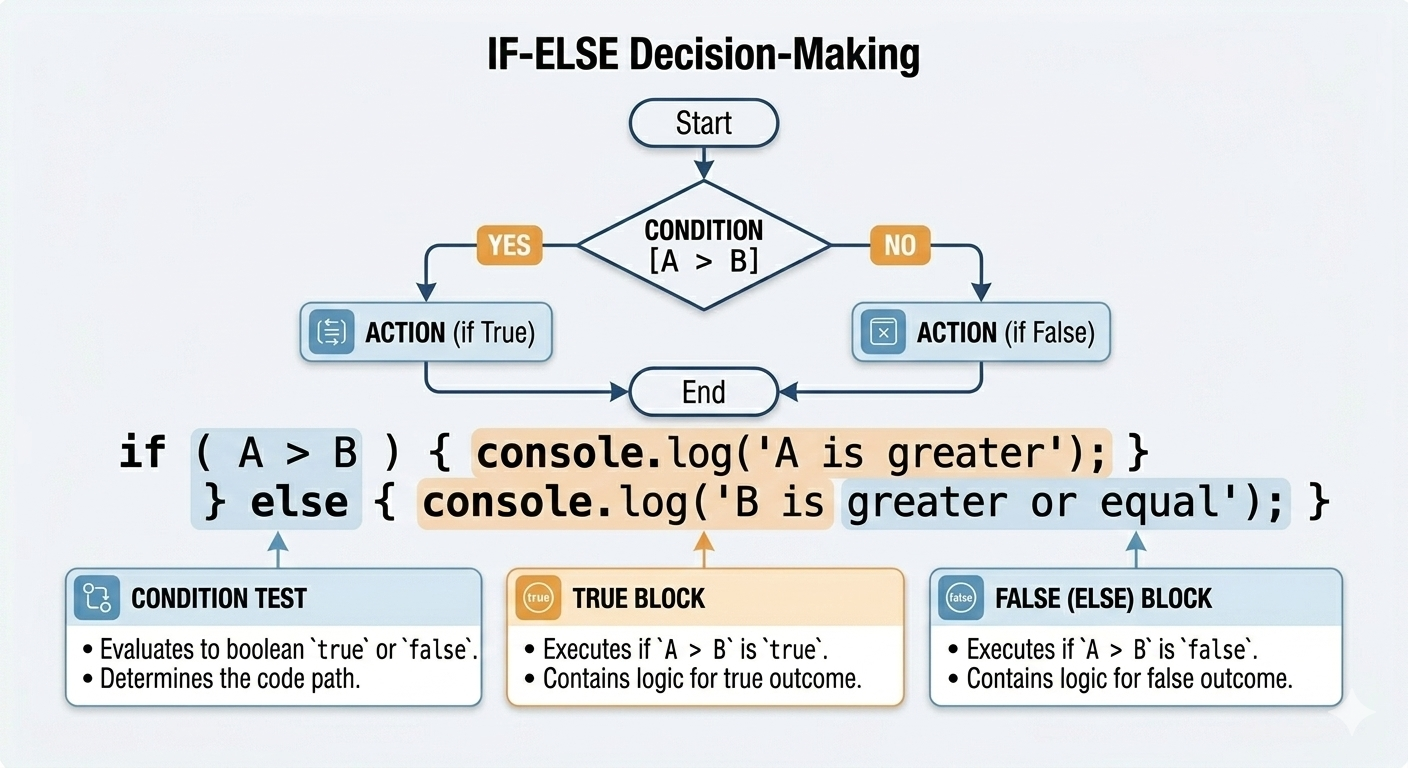
2. The if-else Statement
Real-Life Analogy
"If it is raining, I will take an umbrella. Else, I will wear sunglasses."
Now there are two paths — one for when the condition is true, one for when it's false.
Syntax
if (condition) {
  // runs if condition is TRUE
} else {
  // runs if condition is FALSE
}
Example: Pass or Fail
let marks = 45;

if (marks >= 50) {
  console.log("You passed!");
} else {
  console.log("You failed. Please try again.");
}
Step by step:
Is
marks >= 50? → Is45 >= 50? → No (false)JavaScript skips the
ifblockIt goes to the
elseblock and runs that insteadOutput:
You failed. Please try again.
Change marks to 75, and you'll get: You passed!
Key point: With
if-else, one of the two blocks will always run, never both, never none.
3. The else if Ladder
Real-Life Analogy
"If I scored above 90, I get an A. Else if I scored above 75, I get a B. Else if I scored above 50, I get a C. Else, I fail."
When you have more than two options, you use else if to check them one by one.
Syntax
if (condition1) {
  // runs if condition1 is true
} else if (condition2) {
  // runs if condition2 is true
} else if (condition3) {
  // runs if condition3 is true
} else {
  // runs if none of the above are true
}
Example: Grade Calculator
let marks = 82;

if (marks >= 90) {
  console.log("Grade: A");
} else if (marks >= 75) {
  console.log("Grade: B");
} else if (marks >= 50) {
  console.log("Grade: C");
} else {
  console.log("Grade: F — Better luck next time!");
}
Step by step:
Is
marks >= 90? → Is82 >= 90? → No → SkipIs
marks >= 75? → Is82 >= 75? → Yes → Run this blockOutput:
Grade: BJavaScript stops checking, it doesn't even look at the rest
Key point: JavaScript checks each condition from top to bottom and stops as soon as it finds one that's true. The
elseat the bottom is a safety net, it catches everything else.
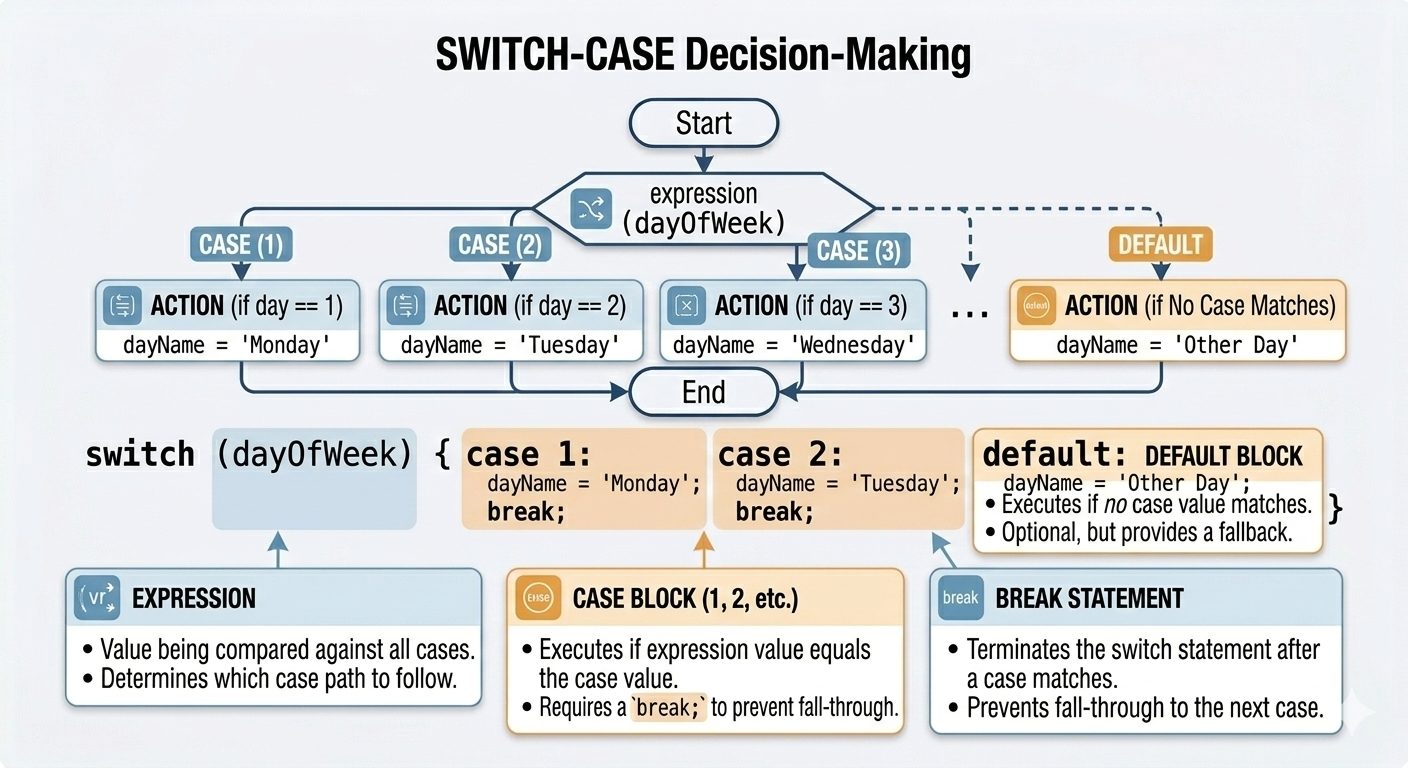
4. The switch Statement
Real-Life Analogy
"What day is it today?"
If it's Monday → "Start of the work week!"
If it's Friday → "Almost the weekend!"
If it's Sunday → "Rest day!"
Anything else → "Just another weekday."
When you're checking one value against many specific options, switch is a cleaner way to do it.
Syntax
switch (value) {
  case option1:
    // code for option1
    break;
  case option2:
    // code for option2
    break;
  default:
    // code if no case matches
}
Example: Day of the Week
let day = 3;

switch (day) {
  case 1:
    console.log("Monday");
    break;
  case 2:
    console.log("Tuesday");
    break;
  case 3:
    console.log("Wednesday");
    break;
  case 4:
    console.log("Thursday");
    break;
  case 5:
    console.log("Friday");
    break;
  case 6:
    console.log("Saturday");
    break;
  case 7:
    console.log("Sunday");
    break;
  default:
    console.log("Invalid day number. Please enter 1 to 7.");
}
Step by step:
JavaScript takes the value of
day(which is3)It checks each
case— is this1? No. Is this2? No. Is this3? Yes!It runs the code for
case 3: printsWednesdayIt hits
breakand exits the switchOutput:
Wednesday
What Does break Do?
break is super important inside switch. It tells JavaScript: "We're done here. Stop checking."
Without break, something weird happens:
let day = 3;

switch (day) {
  case 3:
    console.log("Wednesday");
  case 4:
    console.log("Thursday");
  case 5:
    console.log("Friday");
}
Output:
Wednesday
Thursday
Friday
This is called fall-through, once a case matches, JavaScript keeps running all the code below it until it hits a break or the switch ends. Almost always, you want to use break to avoid this.
What Is default?
default is like the else in an if-else statement. It runs when none of the cases match.
let day = 9;

switch (day) {
  case 1:
    console.log("Monday");
    break;
  case 2:
    console.log("Tuesday");
    break;
  default:
    console.log("Invalid day number.");
}

// Output: Invalid day number.
5. When to Use switch vs if-else
This is a common question beginners ask. Here's a simple guide:
| Situation | Use This |
|---|---|
| Checking a range (e.g., marks > 50) | if-else |
| Comparing one value to many fixed options | switch |
Conditions involve &&, ` |
|
| Simple menu or day/month selection | switch |
| Only 2 outcomes (true or false) | if-else |
Simple Rule of Thumb
Use
if-elsewhen your condition is a question with a range or comparison (greater than, less than, and/or).Use
switchwhen you're asking "which exact value is this?" from a fixed list of options.
Assignment
Try writing these programs yourself. They are great practice!
Assignment 1: Positive, Negative, or Zero
Write a program that checks if a number is positive, negative, or zero.
let number = -7;

if (number > 0) {
  console.log("The number is Positive.");
} else if (number < 0) {
  console.log("The number is Negative.");
} else {
  console.log("The number is Zero.");
}
Try it with: number = 5, number = -3, number = 0
Why if-else? Because we are checking ranges and comparisons (> 0, < 0). This is exactly what if-else is made for.
Assignment 2: Day of the Week Using Switch
Write a program that prints the name of the day based on a number (1 = Monday, 7 = Sunday).
let day = 5;

switch (day) {
  case 1:
    console.log("Monday");
    break;
  case 2:
    console.log("Tuesday");
    break;
  case 3:
    console.log("Wednesday");
    break;
  case 4:
    console.log("Thursday");
    break;
  case 5:
    console.log("Friday");
    break;
  case 6:
    console.log("Saturday");
    break;
  case 7:
    console.log("Sunday");
    break;
  default:
    console.log("Please enter a number between 1 and 7.");
}
Try it with: day = 1, day = 7, day = 10
Why switch? Because we are matching one variable (day) against a list of exact fixed values (1, 2, 3 ... 7). switch is cleaner and easier to read here.
Quick Recap
| Concept | What It Does |
|---|---|
if |
Runs code only if a condition is true |
if-else |
Runs one block if true, another if false |
else if |
Checks multiple conditions one by one |
switch |
Matches a value against specific options |
break |
Exits the switch so no other cases run |
default |
Runs if no case in switch matches |
Key Takeaways
Control flow lets your program make decisions, just like you do in real life.
Use
ifwhen you only care about the "yes" case.Use
if-elsewhen you want to handle both "yes" and "no".Use
else ifwhen there are multiple different conditions to check.Use
switchwhen you're matching one value against a list of exact options.Always use
breakinside switch cases to prevent fall-through.
You've just learned one of the most important building blocks in programming. Once you're comfortable with these, you're ready to tackle loops, functions, and so much more. Keep practising!

