JavaScript Modules: Import and Export Explained

How splitting your code into focused, reusable pieces transforms the way you build and maintain JavaScript applications.
The Problem: Life Before Modules
Imagine you're building a web app. You start with a single app.js file, a hundred lines, easy to manage. A few weeks later, it's 800 lines. A month after that, it's 3,000 lines of tangled functions, utility helpers, event listeners, and API calls, all living together in one enormous file.
This is the monolithic script problem, and nearly every JavaScript developer has lived it.
Here's what that looks like in practice:
<!-- index.html -->
<script src="app.js"></script>
// app.js — everything crammed into one file
let users = [];
let cart = [];

function fetchUsers() { /* ... */ }
function renderUsers() { /* ... */ }
function addToCart(item) { /* ... */ }
function calculateTotal() { /* ... */ }
function formatCurrency(amount) { /* ... */ }
function validateEmail(email) { /* ... */ }
// ... 2,900 more lines
The problems cascade quickly:
Name collisions: two functions accidentally share a name and one silently overwrites the other.
No clear ownership: it's impossible to tell which code belongs to which feature.
Testing is painful: to test
validateEmail, you load the entire 3,000-line file.Team conflicts: multiple developers editing the same file means constant merge conflicts.
Reuse is impossible: that beautifully crafted
formatCurrencyfunction is buried and inaccessible from another project.
Modules exist to solve all of this.
What Is a JavaScript Module?
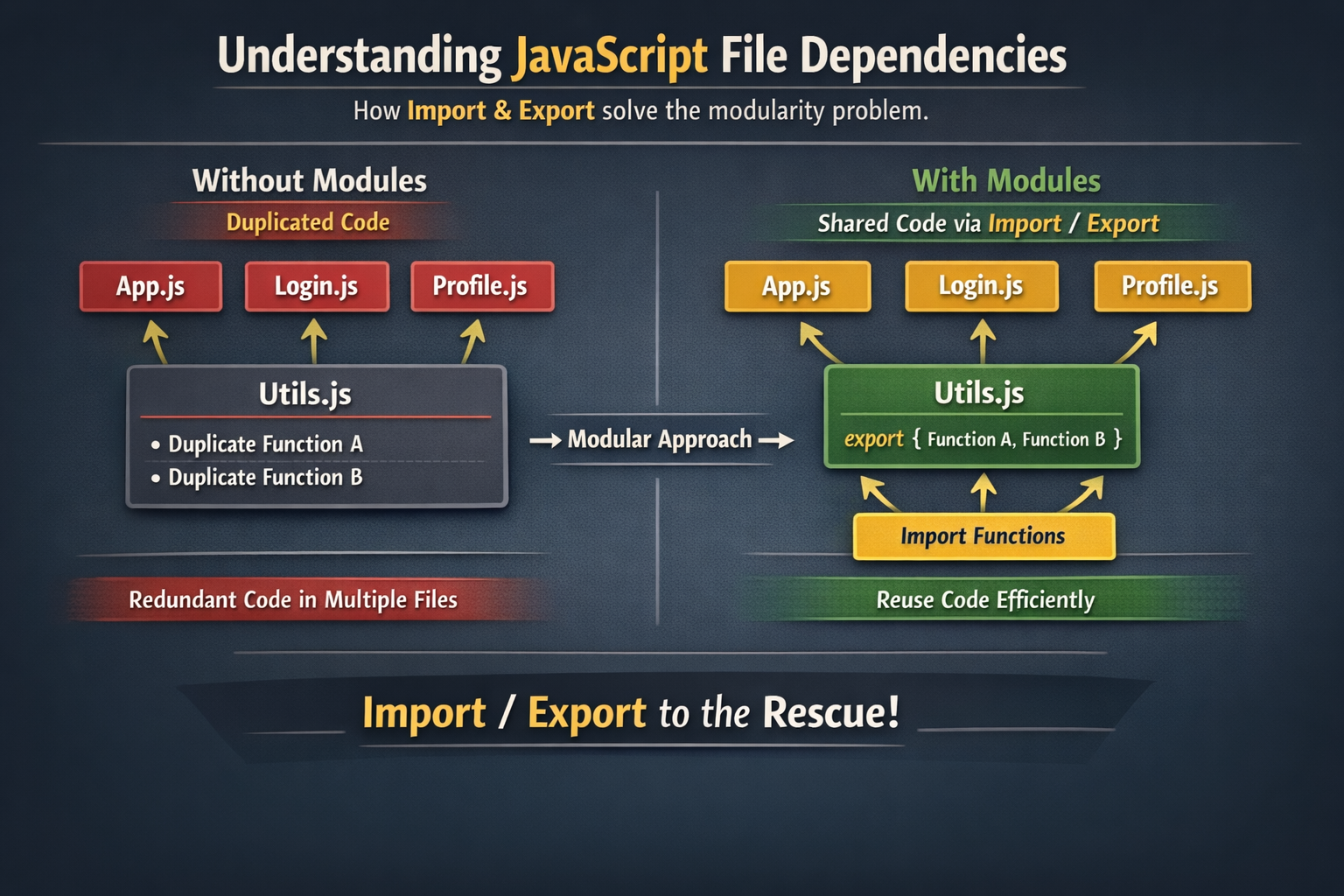
A module is simply a JavaScript file that explicitly declares what it shares with the outside world (its exports) and what it borrows from other files (its imports).
Everything inside a module is private by default. Nothing leaks into the global scope unless you intentionally export it.
To use modules natively in the browser, add type="module" to your script tag:
<script type="module" src="app.js"></script>
That one attribute unlocks the entire ES Module system.
Exporting: Sharing What You Build
Named Exports
The most common pattern is named exports, you label each thing you want to make available:
// utils/math.js

export function add(a, b) {
  return a + b;
}

export function subtract(a, b) {
  return a - b;
}

export const PI = 3.14159;
You can also declare everything first and export at the bottom, which gives a clean summary of a module's public API:
// utils/math.js

function add(a, b) {
  return a + b;
}

function subtract(a, b) {
  return a - b;
}

const PI = 3.14159;

export { add, subtract, PI };
Both approaches are equivalent. The second is preferred in larger files because the export list at the bottom acts as a table of contents.
Default Exports
A module can also have one default export — typically used when a file represents a single primary thing, like a class or a component:
// utils/logger.js

export default function log(message) {
  console.log(`[LOG] ${message}`);
}
Or with a class:
// models/User.js

export default class User {
  constructor(name, email) {
    this.name = name;
    this.email = email;
  }

  greet() {
    return `Hello, I'm ${this.name}`;
  }
}
The key rule: each module can have only one default export, but can have many named exports.
Importing: Using What Others Built
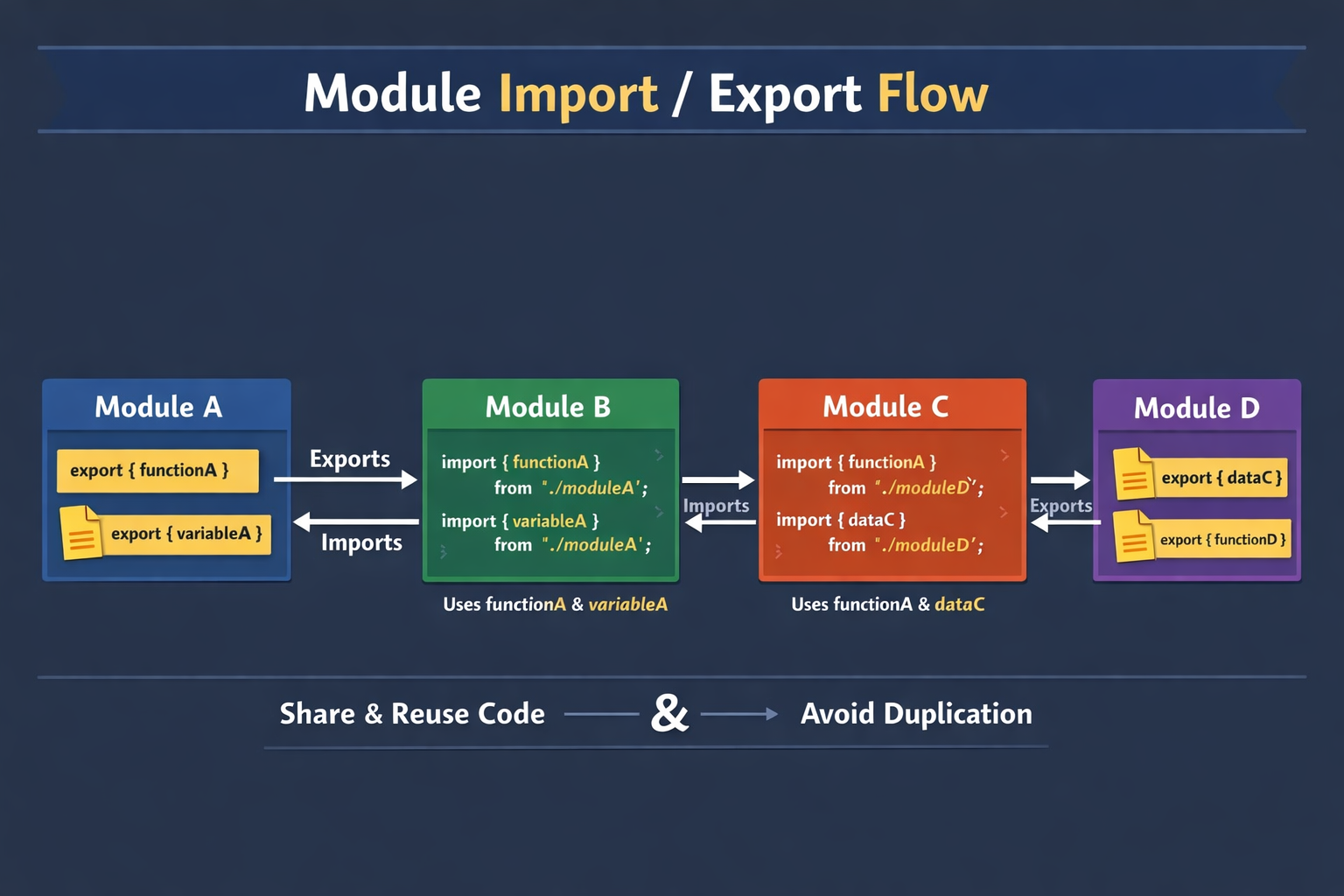
Importing Named Exports
Use curly braces {} to import named exports, and the names must match exactly:
// app.js

import { add, subtract, PI } from './utils/math.js';

console.log(add(5, 3));       // 8
console.log(subtract(10, 4)); // 6
console.log(PI);              // 3.14159
You can rename imports if there's a naming conflict or you just want a shorter alias:
import { add as sum, PI as mathPI } from './utils/math.js';

console.log(sum(2, 2));  // 4
Importing Default Exports
Default exports are imported without curly braces, and you can name them anything you like:
// app.js

import log from './utils/logger.js';
import User from './models/User.js';

log('App started');

const user = new User('Priya', 'priya@example.com');
console.log(user.greet()); // Hello, I'm Priya
Importing Both at Once
A module can have a default export and named exports simultaneously, and you can import both in one statement:
// utils/string.js

export default function capitalize(str) {
  return str.charAt(0).toUpperCase() + str.slice(1);
}

export function trim(str) {
  return str.trim();
}

export function reverse(str) {
  return str.split('').reverse().join('');
}
import capitalize, { trim, reverse } from './utils/string.js';

console.log(capitalize('hello'));     // Hello
console.log(trim('  world  '));       // world
console.log(reverse('JavaScript'));   // tpircSavaJ
Importing Everything with a Namespace
If you want all named exports from a module grouped under one object, use the * as syntax:
import * as MathUtils from './utils/math.js';

console.log(MathUtils.add(10, 5));  // 15
console.log(MathUtils.PI);          // 3.14159
This is useful when a module has many exports and you want to keep them organized under a clear namespace.
Default vs Named Exports: When to Use Which
This is one of the most common points of confusion for developers new to modules. Here's a practical guide:
| Scenario | Recommendation |
|---|---|
| The file has one primary thing to offer | Use a default export |
| The file is a collection of utilities | Use named exports |
| You want auto-complete and refactoring support | Prefer named exports |
| You're building a React component | Convention: default export |
| You're building a utility library | Convention: named exports |
Named exports are generally safer because they enforce consistency. If you rename a named export in its source file without updating imports, your build tools (or the browser) will throw an error immediately. Default exports can be imported under any name, so a rename may go unnoticed.
// This is fine, but risky:
import MyLogger from './utils/logger.js'; // could be 'Foo', 'Bar', anything
import log from './utils/logger.js';      // same thing — no enforcement
// This enforces the contract:
import { log } from './utils/logger.js';  // must match the exported name
A Real-World Example: Putting It Together
Here's how a small feature might be organized using modules:
src/
├── app.js
├── models/
│   └── User.js
├── services/
│   └── authService.js
└── utils/
    ├── validation.js
    └── formatting.js
// utils/validation.js
export function isValidEmail(email) {
  return /^[^\s@]+@[^\s@]+\.[^\s@]+$/.test(email);
}

export function isStrongPassword(password) {
  return password.length >= 8;
}
// utils/formatting.js
export function formatDate(date) {
  return new Intl.DateTimeFormat('en-IN').format(date);
}

export function formatCurrency(amount, currency = 'INR') {
  return new Intl.NumberFormat('en-IN', { style: 'currency', currency }).format(amount);
}
// models/User.js
export default class User {
  constructor(name, email) {
    this.name = name;
    this.email = email;
    this.createdAt = new Date();
  }
}
// services/authService.js
import { isValidEmail, isStrongPassword } from '../utils/validation.js';
import User from '../models/User.js';

export function register(name, email, password) {
  if (!isValidEmail(email)) throw new Error('Invalid email address');
  if (!isStrongPassword(password)) throw new Error('Password too weak');

  return new User(name, email);
}
// app.js
import { register } from './services/authService.js';
import { formatDate } from './utils/formatting.js';

const user = register('Arjun', 'arjun@example.com', 'securePass1');
console.log(`Welcome, \({user.name}! Joined: \){formatDate(user.createdAt)}`);
Each file has one clear job. authService.js doesn't format dates. formatting.js doesn't know about users. app.js orchestrates, it doesn't implement.
Benefits of Modular Code
Breaking your code into modules isn't just tidiness, it fundamentally changes how you work:
1. Encapsulation
Everything inside a module is private unless exported. You can have helper functions, internal state, and implementation details that nobody else can touch or accidentally break.
2. Reusability
A well-written formatCurrency utility can be imported into any project. Write it once, use it everywhere, no more copy-pasting.
3. Maintainability
When a bug appears in user validation, you know exactly which file to open. When you need to change how dates are formatted, there's one place to change it.
4. Testability
Each module is a self-contained unit. You can import isValidEmail in isolation and test it without loading your entire application.
// validation.test.js
import { isValidEmail } from './utils/validation.js';

console.assert(isValidEmail('test@example.com') === true);
console.assert(isValidEmail('not-an-email') === false);
5. Collaboration
When your codebase is split into focused modules, different developers can own different files without constantly overwriting each other's work.
6. Dependency Clarity
import statements at the top of a file document exactly what that module needs. Reading the first few lines of any file tells you its dependencies immediately.
Quick Reference
// --- EXPORTING ---

// Named exports
export const name = 'value';
export function doSomething() {}
export class MyClass {}

// Export list
export { name, doSomething, MyClass };

// Default export
export default function() {}
export default class {}

// --- IMPORTING ---

// Named imports
import { name, doSomething } from './module.js';

// Rename on import
import { name as alias } from './module.js';

// Default import
import MyDefault from './module.js';

// Default + named
import MyDefault, { name, doSomething } from './module.js';

// Import all as namespace
import * as Everything from './module.js';
Conclusion
JavaScript modules are not a complex concept, they're a straightforward solution to a very real problem. By using export to declare what a file shares and import to declare what it needs, you get code that is easier to read, easier to test, easier to maintain, and easier to build on.
The moment your project grows beyond a few hundred lines, modules stop being optional and start being essential. Start small: pick one file that has grown unwieldy, extract a utility function, export it, and import it where needed. The clarity you gain from that first refactor will make the pattern intuitive immediately.
Once you're comfortable with the basics here, the natural next step is understanding how module bundlers like Vite or esbuild optimize modules for production, but that's a story for another article.

