The new Keyword in JavaScript

One small word that creates an entire object, wires up its prototype, and hands it back, automatically.
The Problem It Solves: Making Many Objects of the Same Shape
Imagine you're building a contact book. Every contact has a name, an email, and a phone number. Without any special mechanism, you'd build each one manually:
const contact1 = { name: "Priya Sharma", email: "priya@example.com", phone: "9876543210" };
const contact2 = { name: "Arjun Mehta", email: "arjun@example.com", phone: "9123456789" };
const contact3 = { name: "Zara Khan",   email: "zara@example.com",  phone: "9988776655" };
This works for three contacts. It doesn't scale to three hundred. Worse, there's no guarantee each object has exactly the same shape, a typo gives you phon instead of phone on one object, and nothing warns you.
What you really want is a blueprint, a template that says "every contact looks like this", and a way to stamp out new contacts from it. That's exactly what constructor functions and the new keyword provide.
Constructor Functions: The Blueprint
A constructor function is a regular JavaScript function written with one convention: its name starts with a capital letter, and it's meant to be called with new.
function Contact(name, email, phone) {
  this.name  = name;
  this.email = email;
  this.phone = phone;
}
That's it. No return. No object literal. Just assignments to this.
The capital letter (Contact, not contact) is a convention, JavaScript doesn't enforce it. But it's a signal to every developer reading your code: call this with new. Calling a constructor without new is a silent bug, so the convention matters.
Now, create contacts from it:
const contact1 = new Contact("Priya Sharma", "priya@example.com", "9876543210");
const contact2 = new Contact("Arjun Mehta",  "arjun@example.com", "9123456789");
const contact3 = new Contact("Zara Khan",    "zara@example.com",  "9988776655");

console.log(contact1.name);  // "Priya Sharma"
console.log(contact2.email); // "arjun@example.com"
console.log(contact3.phone); // "9988776655"
Every contact is guaranteed to have the same three properties, set the same way, from the same blueprint. Change the blueprint, change all future instances.
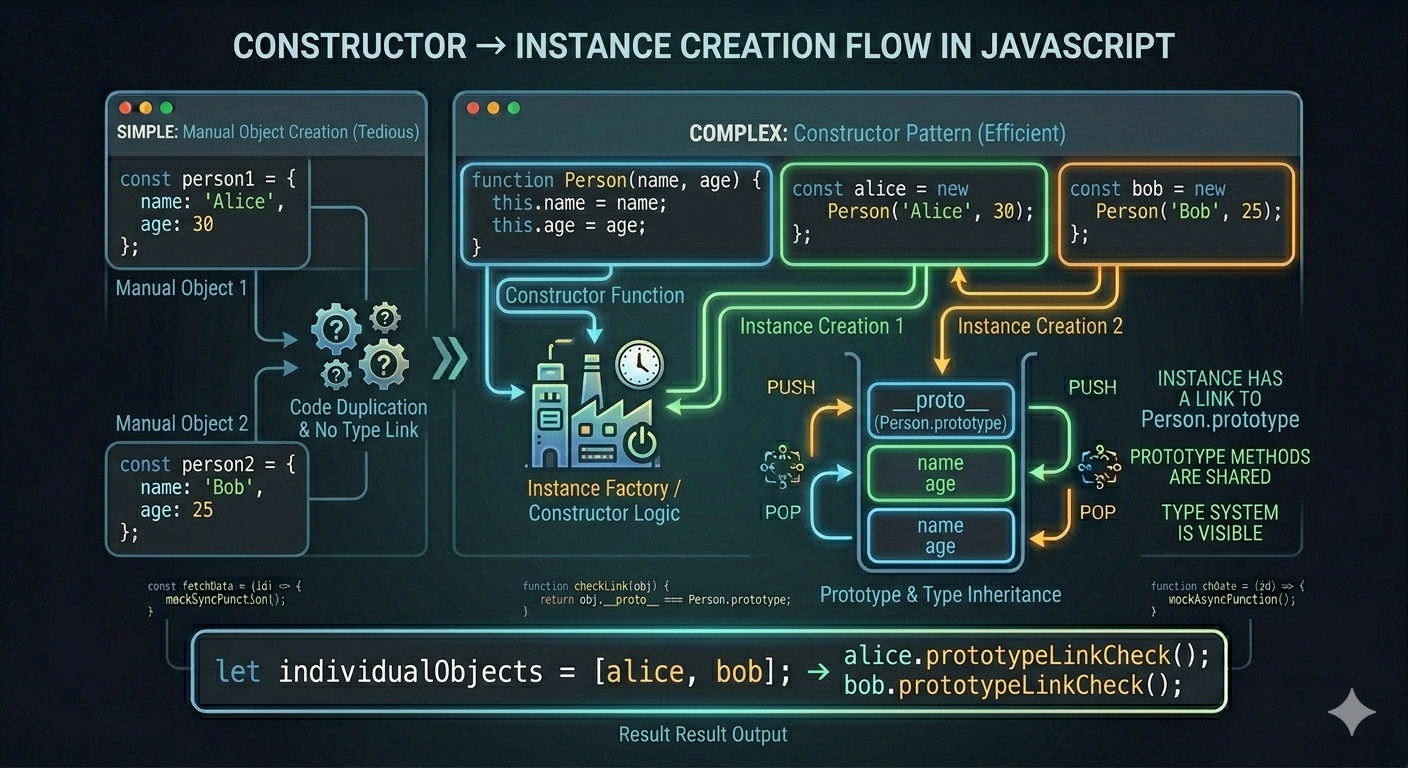
What new Does: Step by Step
new is not magic. It's a precise, predictable sequence of four steps. Understanding those steps is understanding new completely.
Given:
const contact1 = new Contact("Priya Sharma", "priya@example.com", "9876543210");
Here is what happens, in order:
Step 1: A New Empty Object Is Created
JavaScript creates a fresh, plain object, as if you wrote {}:
// Internally, something like this happens:
const obj = {};
This new object has no properties yet. It's completely blank. It's also the object that this will refer to inside the constructor function.
Step 2: this Inside the Function Points to That New Object
The constructor runs, and every time you write this.something = value, you're adding a property to that new blank object:
function Contact(name, email, phone) {
  this.name  = name;   // obj.name  = "Priya Sharma"
  this.email = email;  // obj.email = "priya@example.com"
  this.phone = phone;  // obj.phone = "9876543210"
}
After the constructor body finishes, the object looks like:
{ name: "Priya Sharma", email: "priya@example.com", phone: "9876543210" }
Step 3: The New Object's Prototype Is Linked
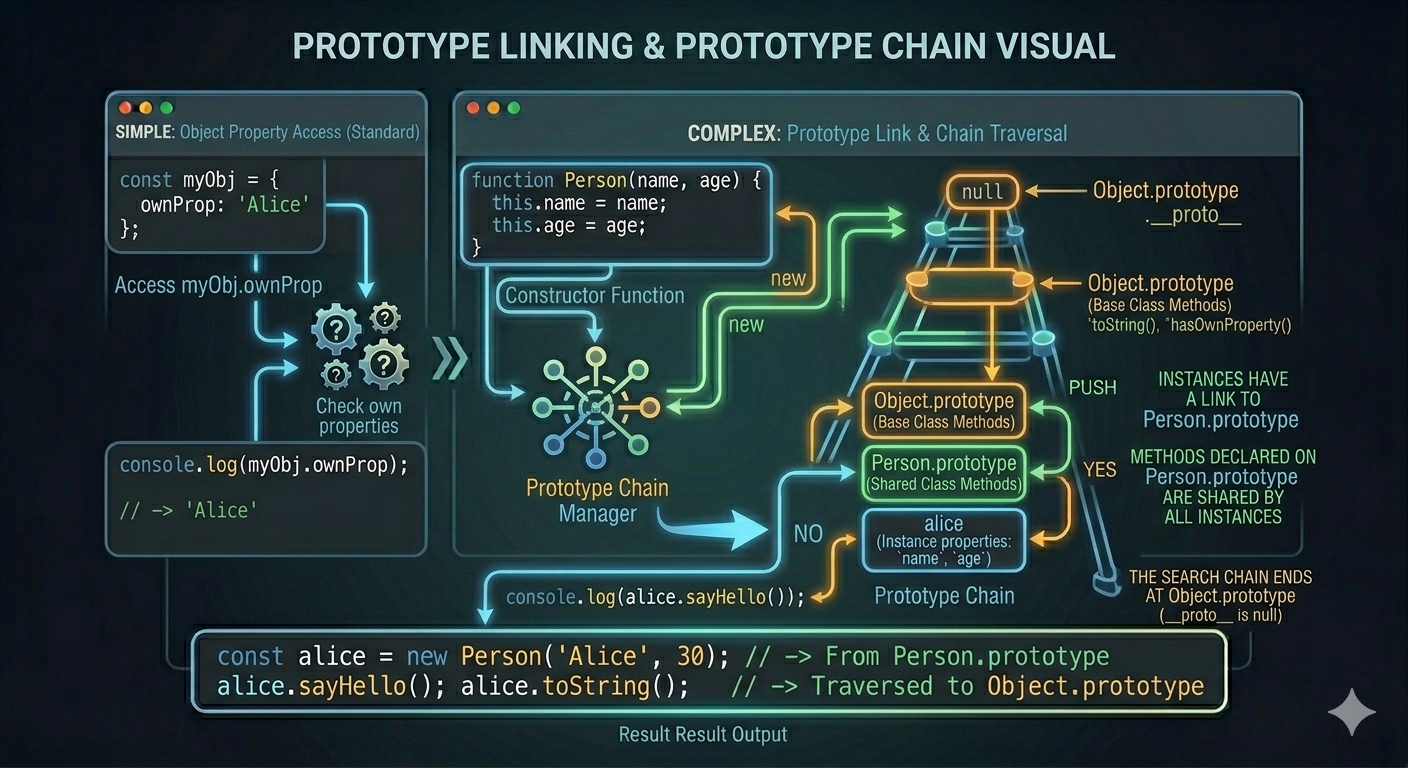
JavaScript automatically sets the new object's internal prototype ([[Prototype]]) to point at Contact.prototype.
// Internally:
Object.setPrototypeOf(obj, Contact.prototype);
This is the step that makes inheritance work — any method added to Contact.prototype becomes available on every instance, without being copied onto each one. More on this shortly.
Step 4: The New Object Is Returned
The constructor function returns the new object automatically — even though there's no return statement. You never have to write return this. The new keyword handles it.
// The function effectively ends like this:
return obj; // automatic — you don't write this
The result is assigned to contact1.
The Four Steps, Visualized
new Contact("Priya Sharma", "priya@example.com", "9876543210")

Step 1:  Create    →  {}
                       │
Step 2:  Populate  →  { name: "Priya Sharma",
                        email: "priya@example.com",
                        phone: "9876543210" }
                       │
Step 3:  Link      →  [[Prototype]] → Contact.prototype
                       │
Step 4:  Return    →  contact1 ← the finished object
How new Links Prototypes
Each instance created by a constructor carries a hidden link to Constructor.prototype. This is where shared methods live, defined once, available on every instance:
function Contact(name, email, phone) {
  this.name  = name;
  this.email = email;
  this.phone = phone;
}

// Method defined on the prototype — shared by ALL instances
Contact.prototype.greet = function() {
  return `Hi, I'm \({this.name}. Reach me at \){this.email}.`;
};

Contact.prototype.getInfo = function() {
  return `\({this.name} | \){this.email} | ${this.phone}`;
};
const contact1 = new Contact("Priya Sharma", "priya@example.com", "9876543210");
const contact2 = new Contact("Arjun Mehta",  "arjun@example.com", "9123456789");

console.log(contact1.greet());
// "Hi, I'm Priya Sharma. Reach me at priya@example.com."

console.log(contact2.greet());
// "Hi, I'm Arjun Mehta. Reach me at arjun@example.com."
Both instances call greet(), but greet is not copied onto either object. It exists once, on Contact.prototype, and both objects reach it through their prototype link.
contact1          contact2
────────          ────────
name: "Priya"     name: "Arjun"
email: "..."      email: "..."
phone: "..."      phone: "..."
    │                 │
    └────────┬─────────┘
             ▼
     Contact.prototype
     ────────────────
     greet: function() { ... }
     getInfo: function() { ... }
This is memory-efficient: no matter how many contacts you create, there is only ever one copy of greet and getInfo in memory, living on Contact.prototype.
Instances: Objects Born from a Constructor
Every object created with new SomeConstructor() is called an instance of that constructor. You can verify this with instanceof:
const contact1 = new Contact("Priya Sharma", "priya@example.com", "9876543210");

console.log(contact1 instanceof Contact); // true
console.log(contact1 instanceof Object);  // true (everything is an Object)
instanceof checks whether Contact.prototype appears anywhere in the object's prototype chain, which it does, because Step 3 of new placed it there.
Each Instance Is Independent
Instances share prototype methods, but their own properties are completely independent:
const contact1 = new Contact("Priya Sharma", "priya@example.com", "9876543210");
const contact2 = new Contact("Arjun Mehta",  "arjun@example.com", "9123456789");

contact1.name = "Priya R. Sharma"; // Changes only contact1

console.log(contact1.name); // "Priya R. Sharma"
console.log(contact2.name); // "Arjun Mehta"  — unchanged
Modifying one instance never touches another. Their own properties (name, email, phone) are stamped out fresh during each new call in Step 2, separate memory, separate values.
A Fuller Example: Constructor in Practice
function BankAccount(owner, initialBalance) {
  this.owner   = owner;
  this.balance = initialBalance;
  this.transactions = [];
}

BankAccount.prototype.deposit = function(amount) {
  this.balance += amount;
  this.transactions.push({ type: 'deposit', amount });
  console.log(`\({this.owner} deposited ₹\){amount}. Balance: ₹${this.balance}`);
};

BankAccount.prototype.withdraw = function(amount) {
  if (amount > this.balance) {
    console.log(`Insufficient funds. Balance: ₹${this.balance}`);
    return;
  }
  this.balance -= amount;
  this.transactions.push({ type: 'withdrawal', amount });
  console.log(`\({this.owner} withdrew ₹\){amount}. Balance: ₹${this.balance}`);
};

BankAccount.prototype.getStatement = function() {
  console.log(`\n— Statement for ${this.owner} —`);
  this.transactions.forEach(t => {
    console.log(`  \({t.type}: ₹\){t.amount}`);
  });
  console.log(`  Current balance: ₹${this.balance}`);
};
const priyaAccount = new BankAccount("Priya", 10000);
const arjunAccount = new BankAccount("Arjun", 5000);

priyaAccount.deposit(2500);    // Priya deposited ₹2500. Balance: ₹12500
priyaAccount.withdraw(1000);   // Priya withdrew ₹1000. Balance: ₹11500

arjunAccount.deposit(500);     // Arjun deposited ₹500. Balance: ₹5500
arjunAccount.withdraw(9000);   // Insufficient funds. Balance: ₹5500

priyaAccount.getStatement();
// — Statement for Priya —
//   deposit: ₹2500
//   withdrawal: ₹1000
//   Current balance: ₹11500

// The two accounts are completely independent:
console.log(priyaAccount.balance); // 11500
console.log(arjunAccount.balance); // 5500
deposit, withdraw, and getStatement are defined once on BankAccount.prototype. Both accounts share those methods. Their owner, balance, and transactions are their own, separate per instance, modified independently.
What Happens Without new
Calling a constructor without new doesn't throw an error, it just does something completely wrong:
// Missing new — silent bug
const oops = Contact("Priya", "priya@example.com", "9876543210");

console.log(oops);       // undefined — no automatic return
console.log(window.name); // "Priya" — this pointed to global object!
Without new, this inside the function refers to the global object (window in browsers, global in Node.js). Every this.name = ... silently pollutes the global scope. The function returns undefined because there's no explicit return. Nothing works as intended — and nothing throws an error to tell you so.
This is why the capital letter convention matters: it's a loud visual reminder to always use new.
The Modern Equivalent: class
ES6 introduced class syntax, which is cleaner and more familiar to developers coming from other languages. But it's important to know: classes in JavaScript are constructor functions underneath. They compile to the exact same prototype mechanism:
// Constructor function style
function Contact(name, email, phone) {
  this.name  = name;
  this.email = email;
  this.phone = phone;
}
Contact.prototype.greet = function() {
  return `Hi, I'm ${this.name}.`;
};

// Class style — identical result
class Contact {
  constructor(name, email, phone) {
    this.name  = name;
    this.email = email;
    this.phone = phone;
  }

  greet() {
    return `Hi, I'm ${this.name}.`;
  }
}
Both are used with new:
const contact = new Contact("Priya", "priya@example.com", "9876543210");
contact.greet(); // "Hi, I'm Priya."
The class syntax is syntactic sugar, it reads more clearly, but new, constructors, and prototypes are the engine running underneath it. Understanding constructor functions means understanding class at the mechanical level.
Key Takeaways
newdoes four things automatically: creates an empty object, bindsthisto it, links the object's prototype toConstructor.prototype, and returns the object.A constructor function is a regular function, conventionally capitalized, designed to be called with
new.Properties assigned with
this.prop = valueare own properties — unique per instance.Methods belong on
Constructor.prototype, shared across all instances, defined only once.Each object created is an instance, verifiable with
instanceof.Calling a constructor without
newsilently pollutes the global scope, always use the capital letter convention.ES6
classis constructor functions and prototypes under a cleaner syntax,newstill drives everything.
Quick Reference
// Define a constructor
function Person(name, age) {
  this.name = age;   // own property — unique per instance
  this.age  = age;
}

// Add shared methods to prototype
Person.prototype.greet = function() {
  return `Hi, I'm ${this.name}`;
};

// Create instances
const p1 = new Person("Priya", 28);
const p2 = new Person("Arjun", 32);

// Access own properties
p1.name;         // "Priya"
p2.name;         // "Arjun"

// Call prototype method
p1.greet();      // "Hi, I'm Priya"
p2.greet();      // "Hi, I'm Arjun"

// Check instance
p1 instanceof Person;  // true
p1 instanceof Object;  // true

// What new does internally (conceptual):
// 1. const obj = {};
// 2. obj.name = name; obj.age = age; (this = obj)
// 3. Object.setPrototypeOf(obj, Person.prototype);
// 4. return obj;
Once you see the four steps new performs, the whole object model of JavaScript, prototypes, classes, instances, snaps into focus.

